






Ask Question Forum:
Model Library:2025-02-08:A.I. model is online auto reply
C
O
M
P
U
T
E
R
2
8
Show
#
ASK
RECENT
←
- Underline
- Bold
- Italic
- Indent
- Step
- Bullet
- Quote
- Cut
- Copy
- Paste
- Table
- Spelling
- Find & Replace
- Undo
- Redo
- Link
- Attach
- Clear
- Code
Below area will not be traslated by Google,you can input code or other languages
Hint:If find spelling error, You need to correct it,1 by 1 or ignore it (code area won't be checked).
X-position of the mouse cursor
Y-position of the mouse cursor
Y-position of the mouse cursor
Testcursor
caretPos
Attachment:===
Asked by Staudte
at 2024-05-25 01:26:46
 Modify
Point:500 Replies:3 POST_ID:828924USER_ID:11824
Topic:
Windows Server 2012;Windows 7;Microsoft Windows Operating Systems
Hi fellow experts,
I know that drive icons and labels of SUBSTed drives can (usually) be changed by working with HKEY_LOCAL_MACHINESOFTWAREMicrosoftWindowsCurrentVersionExplorerDriveIcons. However, on my system it only works on the icon - the label always remains the same as the one of the physical drive. I have restarted the whole system - no change.
I know that drive icons and labels of SUBSTed drives can (usually) be changed by working with HKEY_LOCAL_MACHINESOFTWAREMicrosoftWindowsCurrentVersionExplorerDriveIcons. However, on my system it only works on the icon - the label always remains the same as the one of the physical drive. I have restarted the whole system - no change.
Windows Registry Editor Version 5.00[HKEY_LOCAL_MACHINESOFTWAREMicrosoftWindowsCurrentVersionExplorerDriveIconsG][HKEY_LOCAL_MACHINESOFTWAREMicrosoftWindowsCurrentVersionExplorerDriveIconsGDefaultIcon]@="C:\Windows\system32\imageres.dll,6"[HKEY_LOCAL_MACHINESOFTWAREMicrosoftWindowsCurrentVersionExplorerDriveIconsGDefaultLabel]@="HO1" 1:2:3:4:5:6:7:8:9:
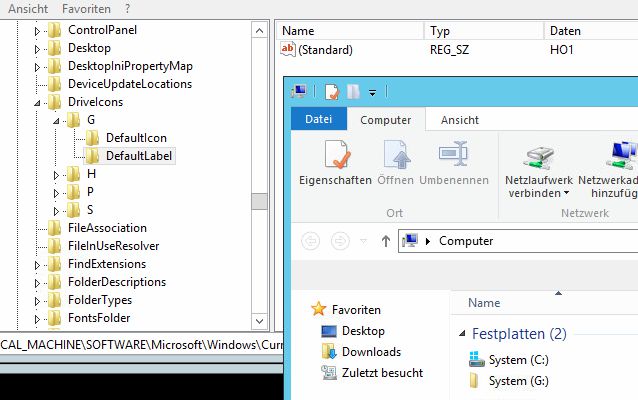
What could be wrong here? (I've done that successfully for ages on a Windows 2008 Terminalserver. Now, on a brand new 2012 Terminalserver, it used to work once (just once!), briefly, but now it suddenly stopped...)
Note: It does work on other drives like the floppy or DVD - just not on the SUBSTed drive...
Thanks for your assistance,
Tom
Expert: duncanb7 replied at 2024-05-25 06:49:25
Thanks for your points
Have a nice day
Duncan
Have a nice day
Duncan
Author: Staudte replied at 2024-05-25 06:37:04
Thank you, that was it - I have recently given the physical drive a label...
From the wikipedia article: "the custom labels are only used if the host drive has no label". I have removed the label and the SUBSTed drives immediately showed their assigned labels...
Tom
From the wikipedia article: "the custom labels are only used if the host drive has no label". I have removed the label and the SUBSTed drives immediately showed their assigned labels...
Tom
Accepted Solution
Expert: duncanb7 replied at 2024-05-25 04:25:12
500 points EXCELLENT
it is because that Substed drive label will inherit from the name of the parent drive
Take a look following sites and explain it more and recommand the fix but not a good one from removal original drive label for the lable change of Susted drive
http://techie-buzz.com/how-to/rename-virtual-subst-drives-windows.html
http://en.wikipedia.org/wiki/SUBST
Hope understand your question completely. If not, please point it out
Duncan
Take a look following sites and explain it more and recommand the fix but not a good one from removal original drive label for the lable change of Susted drive
http://techie-buzz.com/how-to/rename-virtual-subst-drives-windows.html
http://en.wikipedia.org/wiki/SUBST
Hope understand your question completely. If not, please point it out
Duncan

