






Ask Question Forum:
Model Library:2025-02-08:A.I. model is online auto reply
C
O
M
P
U
T
E
R
2
8
Show
#
ASK
RECENT
←
- Underline
- Bold
- Italic
- Indent
- Step
- Bullet
- Quote
- Cut
- Copy
- Paste
- Table
- Spelling
- Find & Replace
- Undo
- Redo
- Link
- Attach
- Clear
- Code
Below area will not be traslated by Google,you can input code or other languages
Hint:If find spelling error, You need to correct it,1 by 1 or ignore it (code area won't be checked).
X-position of the mouse cursor
Y-position of the mouse cursor
Y-position of the mouse cursor
Testcursor
caretPos
Attachment:===
Asked by Camilla
at 2024-11-17 06:12:05
 Modify
Point:500 Replies:11 POST_ID:828800USER_ID:11642
Topic:
jQuery;;Programming for ASP.NET
I followed an example here to make a JQuery calendar work (with help from leakim971).
1. The page works here
http://arms.staging.firehost.com/datetest.aspx
2. Then, I added the control to the actual page but that's when I'm running, what it seems like, conflict with another JQuery library on the page. I played around with commenting out JQuery libraries but I still can't figure it out. Also, I don't think I can just remove them from the page. I don't want to break something else.
I read about using .onConflict() but not sure how.
You can look at it here. I looked at the error in Chrome.
http://arms.staging.firehost.com
You can login with jane@kittycomp.com/Orange123$
Then, on the grid you see, click on "Pending". There's a textbox right above that telerik textbox. That's what I want to work
1. The page works here
http://arms.staging.firehost.com/datetest.aspx
2. Then, I added the control to the actual page but that's when I'm running, what it seems like, conflict with another JQuery library on the page. I played around with commenting out JQuery libraries but I still can't figure it out. Also, I don't think I can just remove them from the page. I don't want to break something else.
I read about using .onConflict() but not sure how.
You can look at it here. I looked at the error in Chrome.
http://arms.staging.firehost.com
You can login with jane@kittycomp.com/Orange123$
Then, on the grid you see, click on "Pending". There's a textbox right above that telerik textbox. That's what I want to work
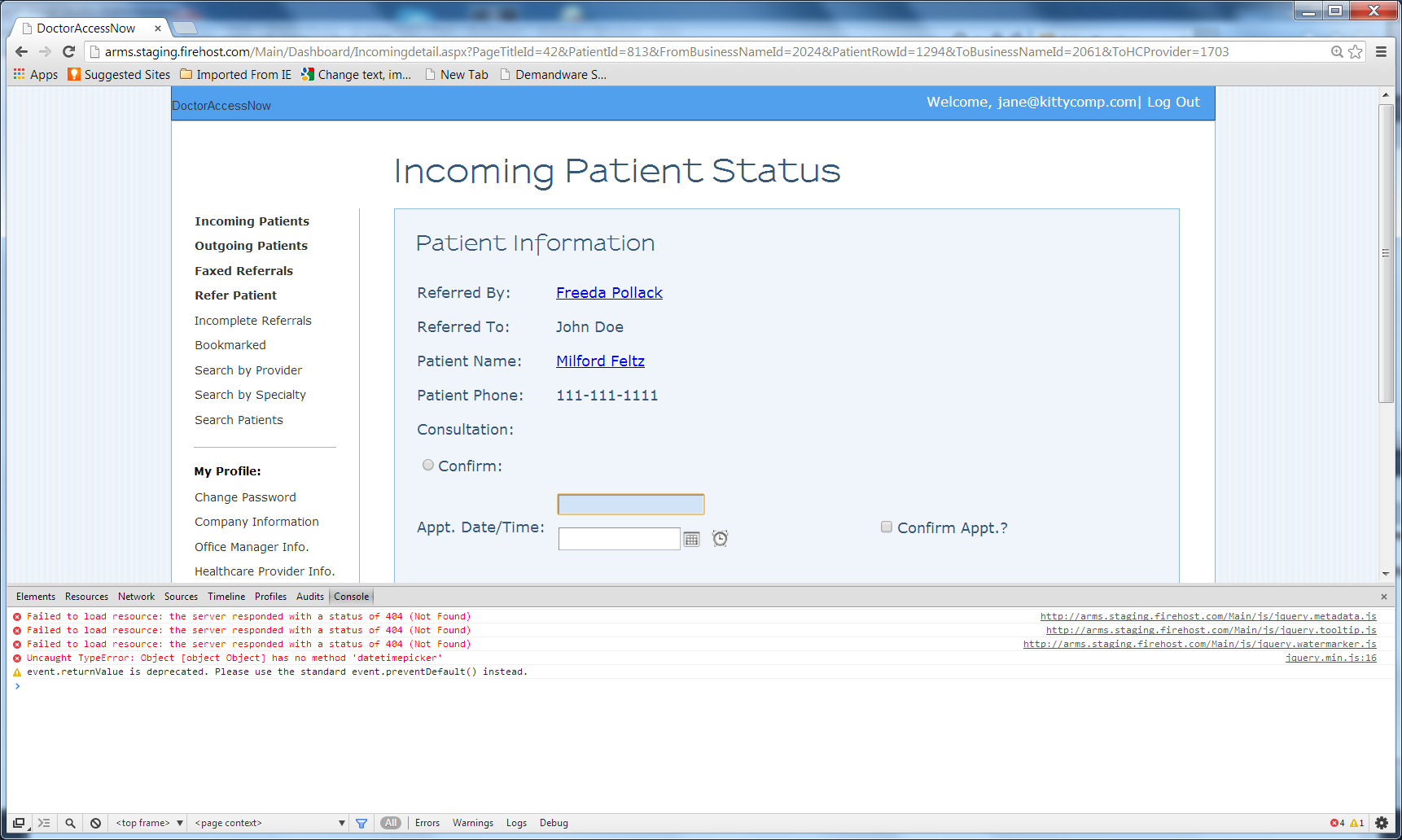
Author: Camilla replied at 2024-11-17 11:23:49
I cleaned the errors and I still have that datetimepicker error.
I do have jquery.min.js. If you look at the "elements" tab in Chrome, it's there
<script language="javascript" type="text/javascript" src="https://ajax.googleapis.com/ajax/libs/jquery/1.5.1/jquery.min.js"></script>
This has to be something else. Again, my test page works. It's this page that doesnt.
I do have jquery.min.js. If you look at the "elements" tab in Chrome, it's there
<script language="javascript" type="text/javascript" src="https://ajax.googleapis.com/ajax/libs/jquery/1.5.1/jquery.min.js"></script>
This has to be something else. Again, my test page works. It's this page that doesnt.
Author: Camilla replied at 2024-11-17 10:22:57
>>if it works, why there is still error about datetimepicker on Chrome debugger console ?
I will clean it but yes, in that example page, it does work. So, the libraries are there. ake a look at this http://arms.staging.firehost.com/datetest.aspx
So, the libraries are there. I think that page with error is trying to read from another JQuery Library. I have the screenshot above : 39654588
It should read the datetime picker from one of those libraries but it's reading it from something else.
Cleaning the errors now and will download the library you mentioned. I'll post back
I will clean it but yes, in that example page, it does work. So, the libraries are there. ake a look at this http://arms.staging.firehost.com/datetest.aspx
So, the libraries are there. I think that page with error is trying to read from another JQuery Library. I have the screenshot above : 39654588
It should read the datetime picker from one of those libraries but it's reading it from something else.
Cleaning the errors now and will download the library you mentioned. I'll post back
Expert: duncanb7 replied at 2024-11-17 09:57:41
if it works, why there is still error about datetimepicker on Chrome debugger console ?
So clean up those 4 or 5 error first . we could not do it
since we don't have the code
So clean up those 4 or 5 error first . we could not do it
since we don't have the code
Author: Camilla replied at 2024-11-17 09:47:18
>>it is not found in jquery.min.js file for datetimepicker
but if you look at
http://arms.staging.firehost.com/datetest.aspx
it works. Look at my screenshot above. I have libraries for it to work. This is it
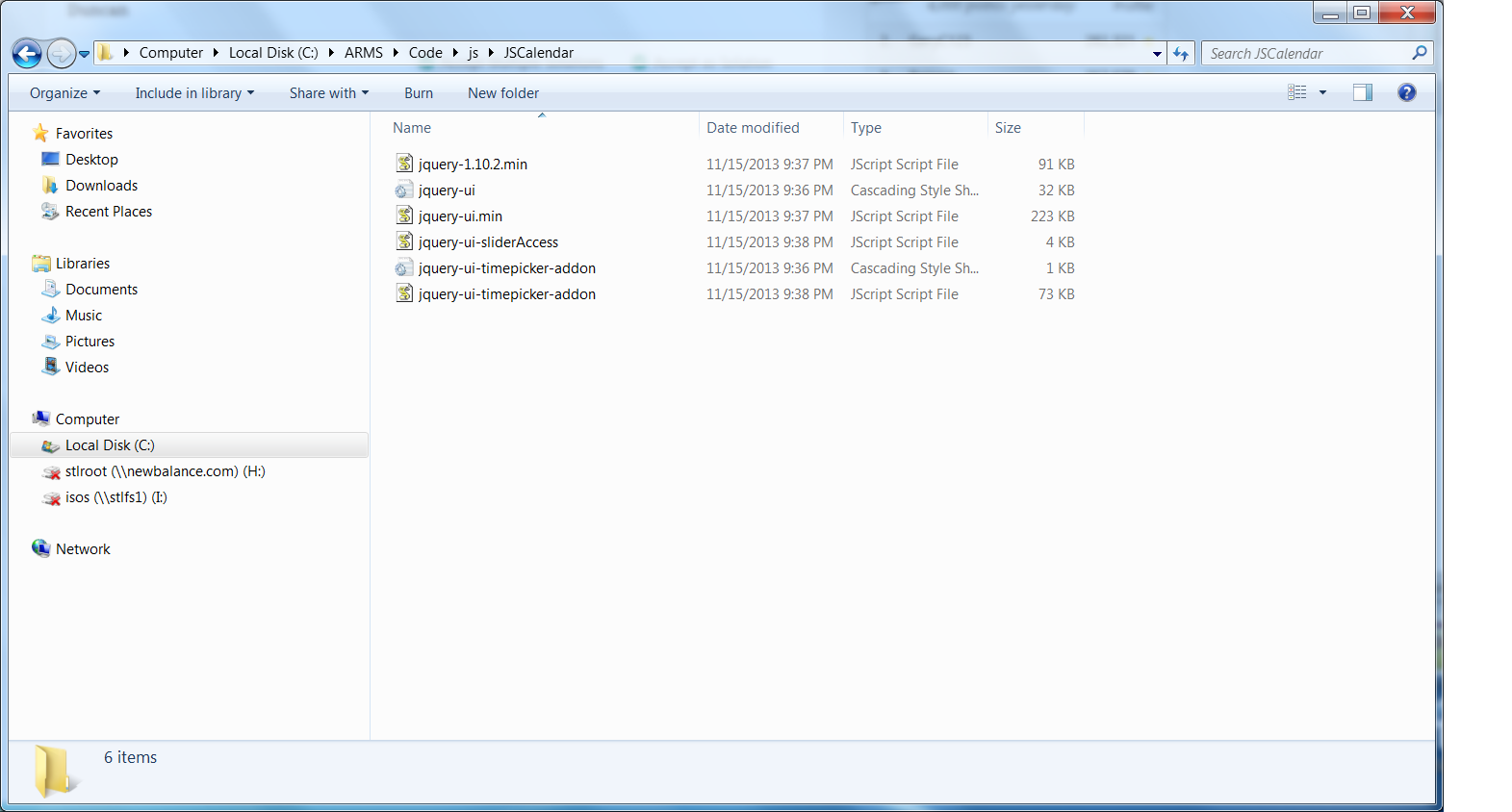
jquery-ui-timepicker-addon
I can try downloading the datepicker but I don't think this is the issue.
but if you look at
http://arms.staging.firehost.com/datetest.aspx
it works. Look at my screenshot above. I have libraries for it to work. This is it
jquery-ui-timepicker-addon
I can try downloading the datepicker but I don't think this is the issue.
Expert: duncanb7 replied at 2024-11-17 07:55:52
Be Reminded, click the view source icon in the http://jqueryui.com/datepicker/
to view the source code
to view the source code
Accepted Solution
Expert: duncanb7 replied at 2024-11-17 07:50:14
500 points EXCELLENT
it is not found in jquery.min.js file for datetimepicker
Please follow example, and downlaod the Jquery Library for datatimepicker
http://jqueryui.com/datepicker/
You have to clean up all error in console error message from Chrome Debugger first,
and download all Jquery file you need, otherwise, the error is always exisitng
Please follow example, and downlaod the Jquery Library for datatimepicker
http://jqueryui.com/datepicker/
You have to clean up all error in console error message from Chrome Debugger first,
and download all Jquery file you need, otherwise, the error is always exisitng
Author: Camilla replied at 2024-11-17 07:44:15
And, for the calendar to work, I have these JQuery libraries. If you look at the test page I have, it works there.
Author: Camilla replied at 2024-11-17 07:40:59
From the above list, this is the error I want to fix
Uncaught TypeError: Object [object Object] has no method 'datetimepicker' jquery.min.js:16
The other errors are ok for now.
Any idea why that datetimepicker doesnt work but works in my test page, as I mentioned above?
Uncaught TypeError: Object [object Object] has no method 'datetimepicker' jquery.min.js:16
The other errors are ok for now.
Any idea why that datetimepicker doesnt work but works in my test page, as I mentioned above?
Expert: duncanb7 replied at 2024-11-17 07:37:27
Failed to load resource: the server responded with a status of 404 (Not Found) http://arms.staging.firehost.com/Main/js/jquery.metadata.js
Failed to load resource: the server responded with a status of 404 (Not Found) http://arms.staging.firehost.com/Main/js/jquery.tooltip.js
Failed to load resource: the server responded with a status of 404 (Not Found) http://arms.staging.firehost.com/Main/js/jquery.watermarker.js
Uncaught TypeError: Object [object Object] has no method 'datetimepicker' jquery.min.js:16
Failed to load resource: the server responded with a status of 404 (Not Found)
there is no such files http:404, server response but cannot find the fie
Did you download all your Jquery Js file into you server domain directory ?
you can search it in google for those four files
Failed to load resource: the server responded with a status of 404 (Not Found) http://arms.staging.firehost.com/Main/js/jquery.tooltip.js
Failed to load resource: the server responded with a status of 404 (Not Found) http://arms.staging.firehost.com/Main/js/jquery.watermarker.js
Uncaught TypeError: Object [object Object] has no method 'datetimepicker' jquery.min.js:16
Failed to load resource: the server responded with a status of 404 (Not Found)
there is no such files http:404, server response but cannot find the fie
Did you download all your Jquery Js file into you server domain directory ?
you can search it in google for those four files
Author: Camilla replied at 2024-11-17 07:28:27
No, that's not the issue. I'll wait for someone else to look at my question
Expert: duncanb7 replied at 2024-11-17 07:14:13
Dear Farzadw,
you mean you get more than one and same file name of Jquery Lib
so that cause the issue , Right ?
If so, you can use fileALreadyLoaded() for not getting double JS file
http://blog.develop.com/2012/10/11/preventing-javascript-files-from-loading-multiple-times/
Duncan
you mean you get more than one and same file name of Jquery Lib
so that cause the issue , Right ?
If so, you can use fileALreadyLoaded() for not getting double JS file
http://blog.develop.com/2012/10/11/preventing-javascript-files-from-loading-multiple-times/
Duncan

