






Ask Question Forum:
Model Library:2025-02-08:A.I. model is online auto reply
C
O
M
P
U
T
E
R
2
8
Show
#
ASK
RECENT
←
- Underline
- Bold
- Italic
- Indent
- Step
- Bullet
- Quote
- Cut
- Copy
- Paste
- Table
- Spelling
- Find & Replace
- Undo
- Redo
- Link
- Attach
- Clear
- Code
Below area will not be traslated by Google,you can input code or other languages
Hint:If find spelling error, You need to correct it,1 by 1 or ignore it (code area won't be checked).
X-position of the mouse cursor
Y-position of the mouse cursor
Y-position of the mouse cursor
Testcursor
caretPos
Attachment:===
Asked by Michael Munger
at 2024-08-07 12:13:33
 Modify
Point:500 Replies:7 POST_ID:828708USER_ID:11410
Topic:
JavaScript;;jQuery
I have a wordpress plugin that does suggestions and reminders that I am writing. The object is: when a person scrolls down the page x pixels, it says: "You may also find this other article useful" (A common function).
What I want to do is this: when a person clicks "no thanks", I want to save a cookie on their machine so that we will never again prompt them with this suggestions for that page for another year (or until they empty their cookies).
Since storing an entire URL as the cookie name has proven to be a bad strategy, I am storing it as an MD5 hash of the full URL.
Creating the cookie works.
However, reading the cookie doesn't.
When I read the cookie, it will either return true (as a string) if they have been to that page before or undefined if the cookie for that page doesn't exist.
My if statements don't work.
What did I do wrong here?
You can see from this image, the MD5 hash for this page is 95f3f49c66555d97b44738bda2e805d7. You can also see that the browser thinks that there is no cookie with this hash in the browser:
What I want to do is this: when a person clicks "no thanks", I want to save a cookie on their machine so that we will never again prompt them with this suggestions for that page for another year (or until they empty their cookies).
Since storing an entire URL as the cookie name has proven to be a bad strategy, I am storing it as an MD5 hash of the full URL.
Creating the cookie works.
However, reading the cookie doesn't.
When I read the cookie, it will either return true (as a string) if they have been to that page before or undefined if the cookie for that page doesn't exist.
My if statements don't work.
What did I do wrong here?
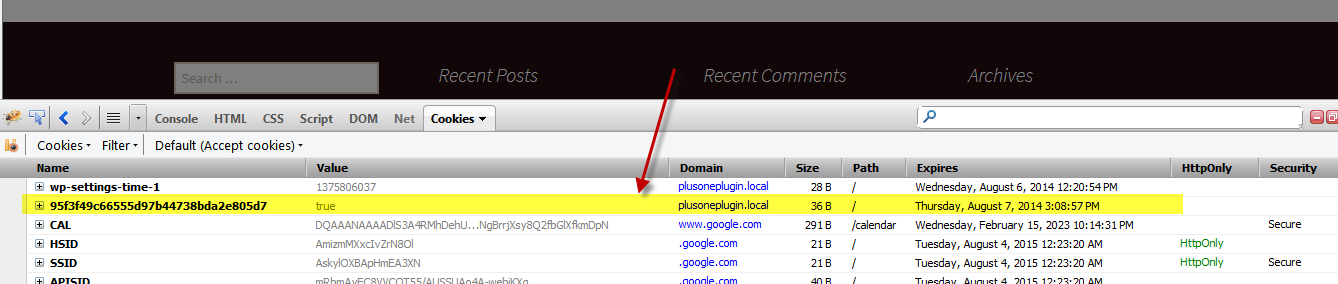
You can see from this image, the MD5 hash for this page is 95f3f49c66555d97b44738bda2e805d7. You can also see that the browser thinks that there is no cookie with this hash in the browser:
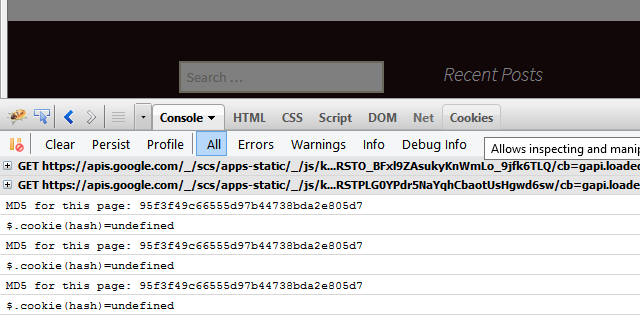
But the cookie is really there:
Here's the code in question:
$(window).bind('scroll', function(){ if($(this).scrollTop() > 200 && NoNag() ) {		//WAIT! Don't ask if they opted out!		$.cookie.raw = true;		var hash = CryptoJS.MD5($(location).attr('href'));		console.log("MD5 for this page: " + hash);		console.log("$.cookie(hash)="+$.cookie(CryptoJS.MD5($(location).attr('href'))));		if($.cookie(CryptoJS.MD5($(location).attr('href')))==undefined)		{			$("#nag").show();		} else {			console.log("Cookie already exists for this page: "+hash);					} } else {	}}); 1:2:3:4:5:6:7:8:9:10:11:12:13:14:15:16:
Libraries in use:
date.js: https://github.com/carhartl/jquery-cookie
md5.js: https://code.google.com/p/crypto-js/
Expert: Rob Jurd replied at 2024-12-10 02:17:08
This question has been classified as abandoned and is closed as part of the Cleanup Program. See the recommendation for more details.
Expert: Rob Jurd replied at 2024-12-06 01:37:41
No comment has been added to this question in more than 21 days, so it is now classified as abandoned.
I have recommended this question be closed as follows:
Accept: tagit (#39400528)
If you feel this question should be closed differently, post an objection and a moderator will read all objections and then close it as they feel fit. If no one objects, this question will be closed automatically the way described above.
tagit
Experts-Exchange Cleanup Volunteer
I have recommended this question be closed as follows:
Accept: tagit (#39400528)
If you feel this question should be closed differently, post an objection and a moderator will read all objections and then close it as they feel fit. If no one objects, this question will be closed automatically the way described above.
tagit
Experts-Exchange Cleanup Volunteer
Accepted Solution
Expert: Rob Jurd replied at 2024-08-11 16:13:52
500 points EXCELLENT
You can't set the index to the md5. I believe the string is too long. You need to modify this slightly to use a shorter index.
eg when setting the cookie use say url or md5 just not the hash itself.
eg when setting the cookie use say url or md5 just not the hash itself.
working example here: http://jsbin.com/uketiq/2
you do your testing by comparing the md5 as strings (note the 3 ===):
$.cookie.raw = true;var hash = String(CryptoJS.MD5($(location).attr('href')));console.log("MD5 for this page: " + hash);console.log("$.cookie(url)=" + $.cookie('url')); var mycookie = String($.cookie('url')); console.log(mycookie);if (mycookie === hash) { console.log("Cookie already exists for this page: " + hash);} else { console.log('showing nag box'); $("#nag").show();} 1:2:3:4:5:6:7:8:9:10:11:12:
If you're generating the cookie from the server then you'll need to change that to work with this jquery.cookie library as it isn't accepting strings this long.
Expert: Modalot replied at 2024-08-11 06:53:23
DrDamnit,
A message has been sent to some additional experts asking them to review your question. We will check back again to see if you are getting the help you need.
This request included Experts from:
JavaScript, Jquery.
Please do not respond to this comment; we will be monitoring your question for activity from the Experts.
Thank you for using Experts Exchange,
Modalot
Community Support Moderator
http://www.experts-exchange.com/R_22678.html
A message has been sent to some additional experts asking them to review your question. We will check back again to see if you are getting the help you need.
This request included Experts from:
JavaScript, Jquery.
Please do not respond to this comment; we will be monitoring your question for activity from the Experts.
Thank you for using Experts Exchange,
Modalot
Community Support Moderator
http://www.experts-exchange.com/R_22678.html
Expert: leakim971 replied at 2024-08-11 04:20:46
this : $.cookie();
return all cookies, did you tried it ?
return all cookies, did you tried it ?
Author: Michael Munger replied at 2024-08-07 13:15:31
Duncan:
Great link.
My second screenshot above details that Firebug sees the cookie, and that it doesn't expire until 8/7/2014 - one year from today.
Any thoughts?
Great link.
My second screenshot above details that Firebug sees the cookie, and that it doesn't expire until 8/7/2014 - one year from today.
Any thoughts?
Expert: duncanb7 replied at 2024-08-07 12:47:14
Take a look into the link first
http://www.sitepoint.com/how-to-deal-with-cookies-in-javascript/
and then check whether the cookies is expired or "not set for expiration date" so
you can not read it
Duncan
http://www.sitepoint.com/how-to-deal-with-cookies-in-javascript/
and then check whether the cookies is expired or "not set for expiration date" so
you can not read it
Duncan

