






Ask Question Forum:
Model Library:2025-02-08:A.I. model is online auto reply
C
O
M
P
U
T
E
R
2
8
Show
#
ASK
RECENT
←
- Underline
- Bold
- Italic
- Indent
- Step
- Bullet
- Quote
- Cut
- Copy
- Paste
- Table
- Spelling
- Find & Replace
- Undo
- Redo
- Link
- Attach
- Clear
- Code
Below area will not be traslated by Google,you can input code or other languages
Hint:If find spelling error, You need to correct it,1 by 1 or ignore it (code area won't be checked).
X-position of the mouse cursor
Y-position of the mouse cursor
Y-position of the mouse cursor
Testcursor
caretPos
Attachment:===
Asked by lynanee
at 2024-07-29 14:34:42
Point:500 Replies:5 POST_ID:828636USER_ID:10
Topic:
Microsoft Applications;;Microsoft Excel Spreadsheet Software
I'm trying to seat people on tables and I created a spreadsheet to do that for me using a lookup formula. The formula works, but it isn't working for all the cells.
Cells H18, H19 should show no name but they are showing 'Happiness' which should actually on a different cell.
Cells J12 - 19 are showing N/A and not pulling the information it's supposed to pull.
The attached spreadsheet explains better.
I can't seem to figure out what the problem is.
Thanks for helping me!
Cells H18, H19 should show no name but they are showing 'Happiness' which should actually on a different cell.
Cells J12 - 19 are showing N/A and not pulling the information it's supposed to pull.
The attached spreadsheet explains better.
I can't seem to figure out what the problem is.
Thanks for helping me!
Attachment:Wedding-guests-SAMPLE.xlsx
Expert: modus_operandi replied at 2024-07-30 03:59:42
Off topic comments removed
modus_operandi
EE Admin
modus_operandi
EE Admin
Expert: pmitllc replied at 2024-07-29 17:37:38
if you don't want table 10 first, then put a leading 0 before table 1-9, so it would be 01, 02, 03...and so on.
Hope this helps!
Hope this helps!
Accepted Solution
Expert: pmitllc replied at 2024-07-29 17:36:08
500 points EXCELLENT
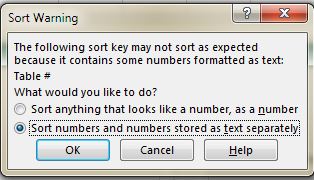
The real problem is that column a in sheet one needs to be sorted for lookup to work. Highlight column A and B and sort by Column A. If it gives you a warning about sorting select sort numbers and numbers stored as text separately.
All should be good now!
All should be good now!
Expert: Iammontoya replied at 2024-07-29 15:05:51
Hi,
It is not working because the format of the items starting with '9-1 is 'General'. All the others are 'Custom'.
Use the format painter and paint the items in '9-x' range to match the other values.
Cheers!
-
It is not working because the format of the items starting with '9-1 is 'General'. All the others are 'Custom'.
Use the format painter and paint the items in '9-x' range to match the other values.
Cheers!
-
Expert: duncanb7 replied at 2024-07-29 14:55:57
If possible, narrow down the issue and re-send xls file(or again) so that
people is easy to understand your question within 30 seconds, just one or
two row or column instead in order to express your problem on xls clearly, and
point out or describle exact formula you can 't solve
If possible, we can solve it within 15 minutes or less
Thanks
Duncan
people is easy to understand your question within 30 seconds, just one or
two row or column instead in order to express your problem on xls clearly, and
point out or describle exact formula you can 't solve
If possible, we can solve it within 15 minutes or less
Thanks
Duncan

