






Ask Question Forum:
Model Library:2025-02-08:A.I. model is online auto reply
C
O
M
P
U
T
E
R
2
8
Show
#
ASK
RECENT
←
- Underline
- Bold
- Italic
- Indent
- Step
- Bullet
- Quote
- Cut
- Copy
- Paste
- Table
- Spelling
- Find & Replace
- Undo
- Redo
- Link
- Attach
- Clear
- Code
Below area will not be traslated by Google,you can input code or other languages
Hint:If find spelling error, You need to correct it,1 by 1 or ignore it (code area won't be checked).
X-position of the mouse cursor
Y-position of the mouse cursor
Y-position of the mouse cursor
Testcursor
caretPos
Attachment:===
Asked by sglee
at 2024-07-24 10:44:26
 Modify
Point:500 Replies:10 POST_ID:828607USER_ID:11460
Topic:
SBS Small Business Server;Network Switches & Hubs;Miscellaneous Networking
Hi,
I have Windows 2011 SBS server (purchased in May 2011) and in the last weeks, it looses network connections while the server is turned on.
It happened two weeks in a row now.
Last week no one could log on to the network from their computers. I was not in the office, so I had an user reboot the SBS2011 and network connection was restored and all users were able to log in.
This morning, the same thing happened. The SBS2011 Server/DC lost network connection. I tried to ping other internal device, but did not get replies. The difference this morning was that there must have been power outage in the building because a lot of UPS devices in the office were beeping and the network switches were powered off. I had to replace the UPS to power network switches/routers ... etc. But the file servers including SBS2011 were connected to newer UPS and they were all up and running.
In summary what is clear is that SBS2011 looses network connection for no good reason. Like today, even if the switch was completely turned off and lost connection from other network devices, when the switch was powered on, the server should have re-established the connection to the network without "reboot".
Can you help?
I have Windows 2011 SBS server (purchased in May 2011) and in the last weeks, it looses network connections while the server is turned on.
It happened two weeks in a row now.
Last week no one could log on to the network from their computers. I was not in the office, so I had an user reboot the SBS2011 and network connection was restored and all users were able to log in.
This morning, the same thing happened. The SBS2011 Server/DC lost network connection. I tried to ping other internal device, but did not get replies. The difference this morning was that there must have been power outage in the building because a lot of UPS devices in the office were beeping and the network switches were powered off. I had to replace the UPS to power network switches/routers ... etc. But the file servers including SBS2011 were connected to newer UPS and they were all up and running.
In summary what is clear is that SBS2011 looses network connection for no good reason. Like today, even if the switch was completely turned off and lost connection from other network devices, when the switch was powered on, the server should have re-established the connection to the network without "reboot".
Can you help?
Expert: duncanb7 replied at 2024-07-25 11:51:00
reset the router, there is reset button at the back of the router
just press the reset button for 30 seconds, and then go to
IP address of the router admin or login page to do connection again
I don't know what is the IP for your router, you can check it from the router manual
or in google search
THe issue shoud be solved
just press the reset button for 30 seconds, and then go to
IP address of the router admin or login page to do connection again
I don't know what is the IP for your router, you can check it from the router manual
or in google search
THe issue shoud be solved
Expert: alizarraga1 replied at 2024-07-25 11:46:17
Is your switch basic or does it have management? If the switch is manageable, check crc errors on the ports. You can also move the server to a different port on the switch. If you have a basic switch, I would replace it as its the cheapest item to replace.
Post the make and model of your switch.
Post the make and model of your switch.
Expert: duncanb7 replied at 2024-07-25 11:32:36
reset the router, there is reset button at the back of the router
just press the reset button for 30 seconds, and then go to
IP address of the router admin or login page to do connection again
I don't know what is the IP for your router, you can check it from the router manual
or in google search
THe issue shoud be solved
just press the reset button for 30 seconds, and then go to
IP address of the router admin or login page to do connection again
I don't know what is the IP for your router, you can check it from the router manual
or in google search
THe issue shoud be solved
Author: sglee replied at 2024-07-24 12:48:42
That must be it. "Allow the computer to turn off this device to save power", when enabled, must have turned off the network adapter card when it detected no connection from the network switch. Hopefully that would be case, although I don't understand why that option is turned on by default on the file server. I saw MS knowledge-base article ( http://support.microsoft.com/kb/837058 ) that this option saves battery on laptops.
Thank you for your help.
Thank you for your help.
Author: sglee replied at 2024-07-24 11:22:54
@esskayb2d - UPS devices were connected to switches/routers/Servers.
but apparently the one connected to switches/routers went dead after or during the power outage. I replaced it this morning immediately to power up the switches/routers.
but apparently the one connected to switches/routers went dead after or during the power outage. I replaced it this morning immediately to power up the switches/routers.
Expert: esskayb2d replied at 2024-07-24 11:17:31
Uncheck the first one, that may be your issue.
Also if the power was an issue, make sure that you buy a power backup, so the computer will not detect surges
Also if the power was an issue, make sure that you buy a power backup, so the computer will not detect surges
Author: sglee replied at 2024-07-24 11:12:21
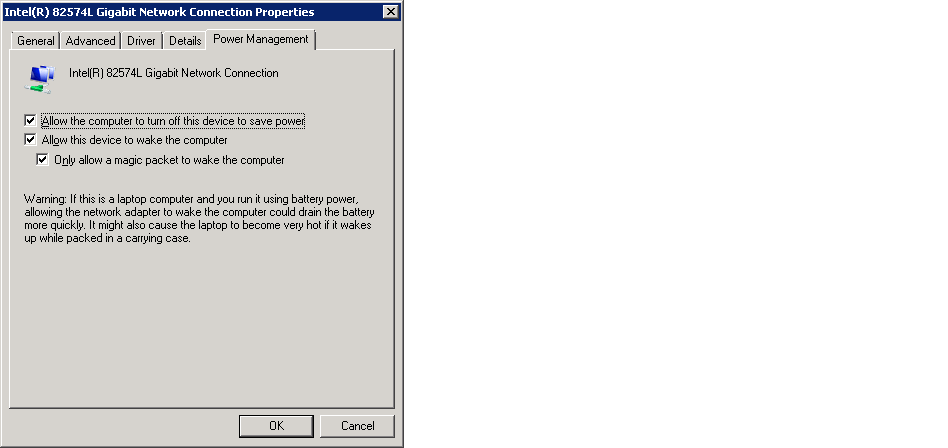
@esskayb2d - before rebooting the server, I unplugged the Ethernet cable and plugged back, but to no avail - both last week and today.
@alizarraga1 - This file server has static IP and there are other member servers with static IP, but all other computers on the network receive IP addresses from the DHCP server running on SBS2011. I would have seen "Duplicate IP" message already if that was the case.
@lruiz52
Please see the screenshot. Which check-box do you want me to un-check - all of them?
Come to think of it, this could have been causing the problem.
Accepted Solution
Expert: lruiz52 replied at 2024-07-24 11:01:17
500 points EXCELLENT
I had a similar issue and the fix was too uncheck the "Allow the computer to turn off this device to save Power" box in my NICs Power Management Tab in the Connections Properties.
Expert: alizarraga1 replied at 2024-07-24 10:59:29
Also check to see if someone else on the network is not using the servers ip address. It maybe a duplicate address.
Expert: esskayb2d replied at 2024-07-24 10:54:42
Firstly, Check all the wires on the server, and the switchboard. this is a typical problem when wires not fully connected.
Disconnect the switchboard, and reconnect it
Same for all routers and modems
Disconnect the switchboard, and reconnect it
Same for all routers and modems

