Ask Question Forum:
Model Library:2025-02-08:A.I. model is online auto reply
C
O
M
P
U
T
E
R
2
8
Show
#
ASK
RECENT
←
- Underline
- Bold
- Italic
- Indent
- Step
- Bullet
- Quote
- Cut
- Copy
- Paste
- Table
- Spelling
- Find & Replace
- Undo
- Redo
- Link
- Attach
- Clear
- Code
Below area will not be traslated by Google,you can input code or other languages
Hint:If find spelling error, You need to correct it,1 by 1 or ignore it (code area won't be checked).
X-position of the mouse cursor
Y-position of the mouse cursor
Y-position of the mouse cursor
Testcursor
caretPos
Attachment:===
Asked by duncanb7
at 2024-07-17 07:09:36
 Modify
Point:500 Replies:12 POST_ID:828516USER_ID:11059
Topic:
Visual Basic Programming;;Microsoft Excel Spreadsheet Software
I get one textfile file and its format with character seperator of "|" and I am using following VBA code to get
the data and parsing into Excel sheet
workbooks.OpenText filename:="http://www.example.com/getData",DataType:=xlDemlimited, _
Others:=True, OtherChar:="|"
and it works fine but the parsing data output will be put into column direction instead of row direction.
Since it is more 1000 seperator of "|", so I prefer to parse the data into row direction
Orginal Textfile file and its format as follows:
123|AB|123|ABCD......................................
output from the previouse OpenText function in Excel 2003 VBA code,
123 AB 123 ABCD
My expectation for parsing textfile data by OpenText VBA code
123
AB
123
ABCD
Since the file is in text format and NOT csv format, so I think I need to
change setting to let the OpenText function to do parsing data into row data
but How, I google it in website, no information about the issue,
Please advise
Duncan
the data and parsing into Excel sheet
workbooks.OpenText filename:="http://www.example.com/getData",DataType:=xlDemlimited, _
Others:=True, OtherChar:="|"
and it works fine but the parsing data output will be put into column direction instead of row direction.
Since it is more 1000 seperator of "|", so I prefer to parse the data into row direction
Orginal Textfile file and its format as follows:
123|AB|123|ABCD......................................
output from the previouse OpenText function in Excel 2003 VBA code,
123 AB 123 ABCD
My expectation for parsing textfile data by OpenText VBA code
123
AB
123
ABCD
Since the file is in text format and NOT csv format, so I think I need to
change setting to let the OpenText function to do parsing data into row data
but How, I google it in website, no information about the issue,
Please advise
Duncan
Expert: Badotz replied at 2024-07-22 14:09:29
No worries - glad to help.
Author: duncanb7 replied at 2024-07-22 14:06:03
The is solved after I
use winhttp function in vba
and save it into string variable
Thanks
Duncan
use winhttp function in vba
and save it into string variable
Thanks
Duncan
Assisted Solution
Expert: aikimark replied at 2024-07-18 11:57:35
166 points GOOD
Yes. It looks like your data only contains one column and that "|" was used as the record/row delimiter, rather than vbCrLf.
You can pre-process the file and use the .OpenText method.
Alternatively you can read the entire contents into a string variable (one operation) and then use Split() function to parse the data on the "|" character.
If you copy that parsed data into a two dimensioned array, you will be able to move it into your worksheet in one operation. I describe this in my Fast Data Push to Excel article:
http://www.experts-exchange.com/A_2253.html
You can pre-process the file and use the .OpenText method.
Alternatively you can read the entire contents into a string variable (one operation) and then use Split() function to parse the data on the "|" character.
If you copy that parsed data into a two dimensioned array, you will be able to move it into your worksheet in one operation. I describe this in my Fast Data Push to Excel article:
http://www.experts-exchange.com/A_2253.html
Author: duncanb7 replied at 2024-07-18 11:44:52
your mean "|" is same as vbCrLf, and the following code will be better and correct ?
Please advise
Ducan
workbooks.OpenText filename:="http://www.example.com/getData",DataType:=xlDemlimited, _
Others:=True, OtherChar:=vbCrlF
Please advise
Ducan
workbooks.OpenText filename:="http://www.example.com/getData",DataType:=xlDemlimited, _
Others:=True, OtherChar:=vbCrlF
Assisted Solution
Expert: aikimark replied at 2024-07-17 18:21:19
167 points GOOD
change all the | to vbCrLf and then import the data into your worksheet.
Expert: Badotz replied at 2024-07-17 09:00:02
Then substitute your method of choice for step #1.
How it is done doesn't matter. That is is done matters.
How it is done doesn't matter. That is is done matters.
Author: duncanb7 replied at 2024-07-17 08:52:47
can filesysystemobject opentextfile can link extrernal website link instead of file system file in WIndow XP
I think it is not
I think it is not
Expert: Badotz replied at 2024-07-17 08:32:14
For each textfile:
1. Read the textfile using the FileSystemObject
2. Create an array of text values using Split
3. Use a loop to put each text value in it's own row
1. Read the textfile using the FileSystemObject
2. Create an array of text values using Split
3. Use a loop to put each text value in it's own row
Author: duncanb7 replied at 2024-07-17 07:46:54
And the problem is there is more than 1000 of "|", the excel allow number of column is limited
from A to IZ, so it is better using VBA, but Now
from A to IZ, so it is better using VBA, but Now
Author: duncanb7 replied at 2024-07-17 07:43:41
how to do it in vba since I get 500 different getdata files
Accepted Solution
Expert: Badotz replied at 2024-07-17 07:41:50
167 points GOOD
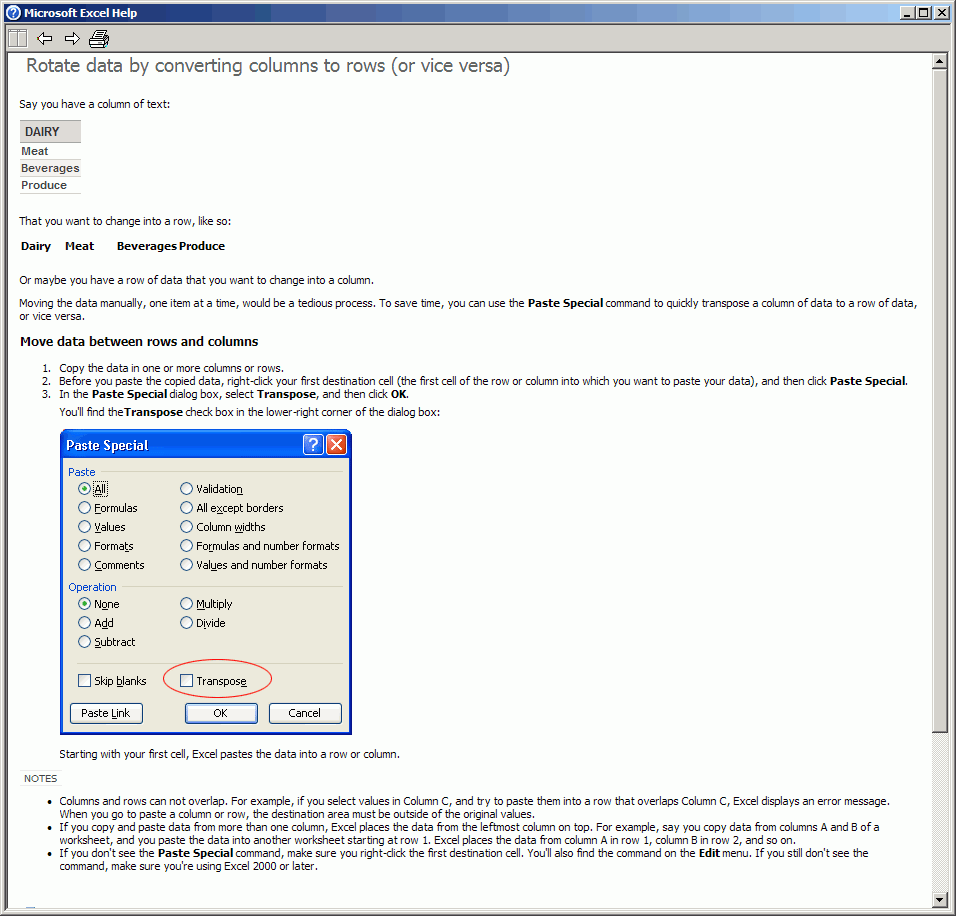
The above is from Excel 2003 help.
Expert: Badotz replied at 2024-07-17 07:41:24
After you've imported your data into columns, convert it to rows.